
POWER & VOLUME
- Start with the TV turned on.
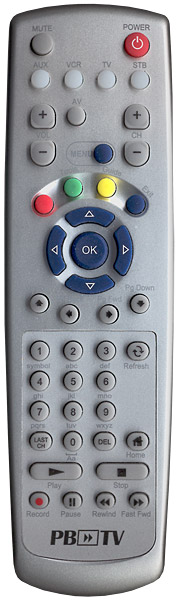
- Press the TV button and the OK button simultaneously for 3 seconds. The TV LED will turn on.
- Press the CH+ or CH- button one step at a time or keep it pressed. The remote will issue a series of Power ON/OFF commands. release the CH+ or CH- button as soon as the TV turns off.
If you do not press either the CH+ or CH- buttons within 20 seconds, the TV LED will turn off and exit the set-up mode and you will need to start over.
- Press the same TV button used to store the code. The TV LED will blink twice to confirm that the code has been stored.
- You can verify that you selected the correct code by pressing the POWER button again. The TV should either turn on or off.
- To search for the codes for other devices such as a VCR or DVD player, repeat the above instructions but substitute the AUX or VCR key for the auxiliary device you are looking for.
ADDITIONAL AMINO REMOTE CONTROL SETUP AND TROUBLESHOOTING